
Unreal Engine 5 is not just a performance problem, it is a UX problem

The current debate
Unreal Engine 5 has been at the center of debate. Many players point out that UE5 games often stutter or underperform.
Tim Sweeney, argued that the main issue lies with developers who fail to optimize, explaining that many studios target high-end hardware first and only worry about optimization later (PC Gamer).
My experience across diverse teams
I work on graphics optimization, especially for VR where every millisecond counts. I have collaborated with both highly technical engineers and artists with little programming background, often under tight production constraints. In Unity, I learned how to squeeze every frame possible by going far beyond the defaults. That experience shapes my view: UE5’s problems are not just technical, they are also UX problems rooted in the philosophy of the engine.
Optimization is endless
Every engine has room for improvement. Developers can always go deeper. For instance, in FFmpeg some functions were hand-written in assembly to gain more performance (Techspot). Unreal could certainly be further optimized, and developers must improve their skills. But this is only part of the story. The real weight comes from how UE5 is structured out of the box.
Top-down vs bottom-up philosophy
Unreal takes a top-down approach. Start a project and you immediately get a character, post-processing, complex lighting, Nanite, Lumen, Virtual Shadow Maps, reflections, and temporal anti-aliasing.
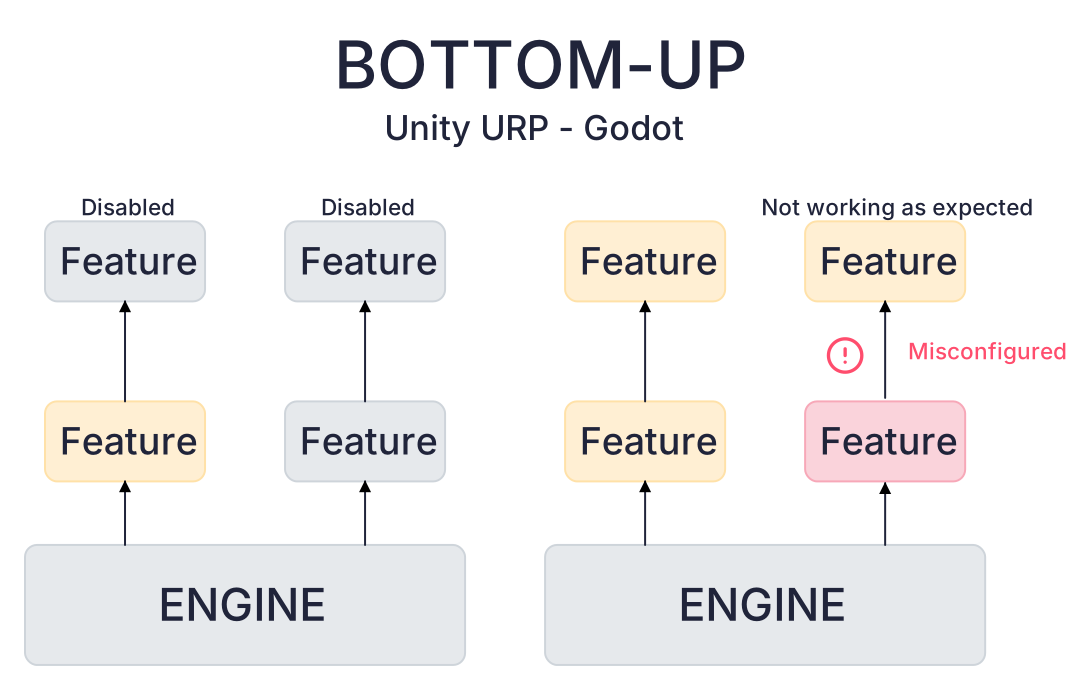
Unity or Godot follow a bottom-up model. Projects begin nearly empty, and developers add features as needed.
This leads to opposite pitfalls. In Unreal, disabling a feature can leave hidden dependencies running, quietly draining resources.
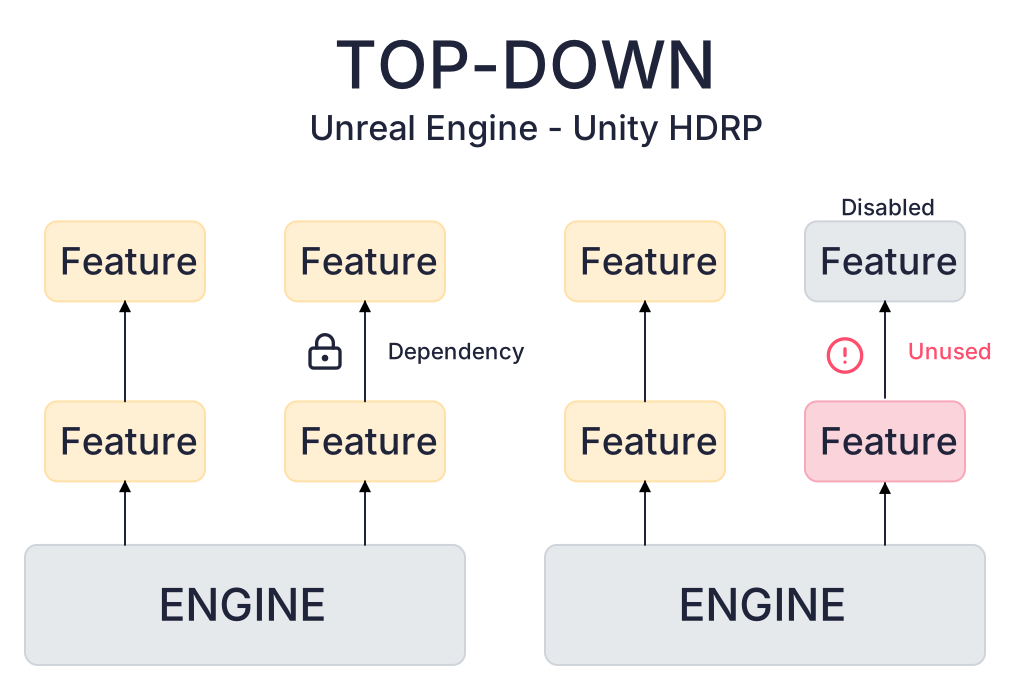
In Unity, adding a feature may fail because you forgot required components, or it might run with the wrong setup and look broken. Unreal wastes performance silently, Unity risks misconfigured visuals.
Default rendering pipelines compared
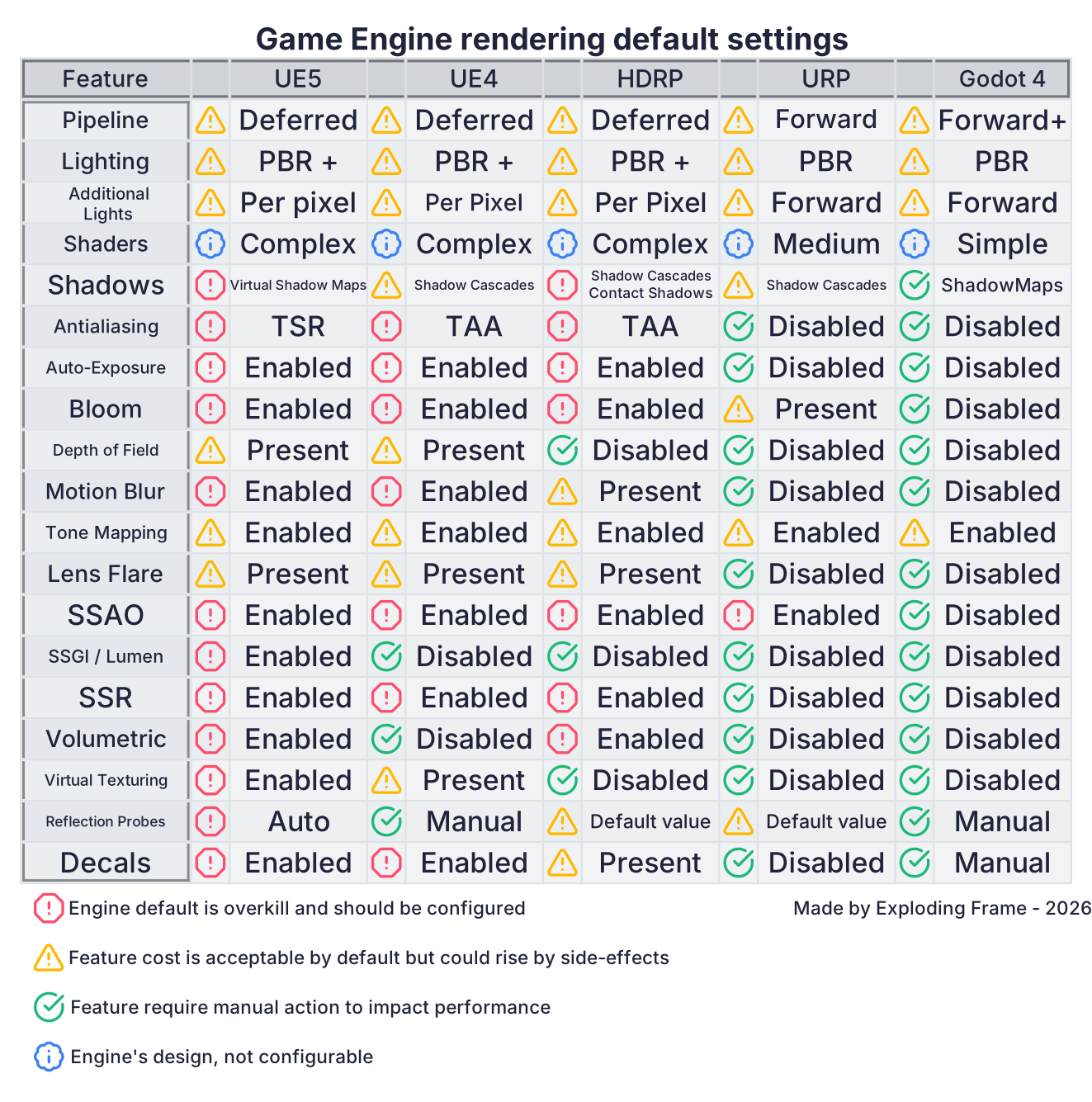
(Please take good note that this picture is only comparing feature enabled by default and not all available options)
These defaults explain why Unreal 5 feels heavy even for an empty project. The technology is strong, but it assumes you want the most advanced pipeline from the start. Without a clear way to see what is actually active, developers leave expensive systems running without realizing it.
Hidden hardware requirements
Some UE5 features depend on GPU capabilities that are not universal. This makes the defaults even heavier for teams who do not know what hardware assumptions are being made.
- Nanite → requires Shader Model 6.0 and wave operations. Not supported on older GPUs (pre-RDNA, pre-Turing).
- Virtual Shadow Maps → consume large amounts of VRAM and need modern texture array support. Struggle on cards with low memory.
- Virtual Texturing → may depend on tiled resources and partially resident textures, not always available or efficient on all drivers.
ERRATUM : Virtual Texture only depends on tiled resources when used in Virtual Shadow Maps. - Temporal Super Resolution (TSR) → benefits from variable rate shading (VRS), only present on newer architectures.
- Async Compute scheduling → heavily used by UE5 features, but poorly supported on older GPUs.
Unity avoids this by shipping more conservative defaults. Most advanced features such as SSGI, volumetrics, or ray traced effects are off by default, so projects start lighter even on modest hardware.
Epic’s response and its limits
Epic plans to improve UE5 performance and provide training, which is helpful, but still treats the issue as mainly technical. The reality is that engines are used not only by programmers.
Technical artists and art directors often come from 3D backgrounds. They understand pipelines, but cannot be expected to know which hidden systems are still running or how features interact deep in the engine.
Even for more advanced Technical Artist tinkering with Unreal is not as straightforward as in Unity. When creating a rendering feature, you hit really quickly the wall of “You need to compile the engine” this is often a step too much for Technical Artist that will find workarounds. Those workarounds can become performance problems.
UX is the real opportunity
The biggest step forward would not be a new rendering technique, but better UX. Engines should give developers, even non-technical ones, a clear view of which features are active, which dependencies remain hidden, and what each of them costs. Games already display VRAM or GPU usage in real time. Engines could do the same at the feature level: if you enable Lumen or Virtual Shadow Maps, you should also see which systems are tied to them and how much performance they consume.
There are already good examples outside game development. In web design, sites like caniuse.com let developers check which CSS features are supported across browsers. A similar approach could be applied in engines: a compatibility chart showing which rendering features depend on modern hardware capabilities such as compute shaders, virtual texturing, or mesh shading, instead of leaving developers to figure it out on their own.
Professional GPU tools already exist such as Nsight, PIX or RenderDoc. They are a goldmine for experienced developers but for most teams they are too complex to use day to day. At Albyon, one of my biggest wins was building an automation pipeline: it launched a build, ran a GPU analysis, and posted a simple HTML report directly into Slack.
I processed the low-level counters (ALU, SFU, TEX ratios, warp occupancy) with Google Colab and translated them into plain language metrics and colorful graphs : “Texture Complexity Score”, “Fragment Complexity Score”, “Vertex Complexity Score”, “Overdraw”.
This gave every department instant insight. Artists, designers, and engineers could look at the summary and immediately spot which of their choices might be dragging performance down. Those summaries could be quickly compared to see the evolution build after build.
Some people will probably argue that such a “diluted” report does not show the full picture and can even be misleading. That is true, but it is also the point. Accessibility matters. Artists often simplify their work to make it more understandable to the audience, trading precision for clarity. Technical people and engine developers need to do the same. Accessibility leads to curiosity, curiosity leads to interest, and interest leads to knowledge.
Before setting up the automation at Albyon, I was trying to teach optimization through slides, meetings, and workshops. After the automation was in place, people started coming to me with questions like “Why did the vertex complexity double in scene 32 since the last build?” We could then solve it together. It was less work for me, because the team could identify issues on their own. People became curious, they cared about performance, and even producers used those reports to communicate with clients, because they could finally understand them.
Conclusion
The UE5 debate should not be reduced to “developers don’t optimize” or “Epic needs to make the engine faster.” The real challenge is visibility. Unreal Engine 5 ships with advanced features like Nanite, Lumen, and Virtual Shadow Maps that quietly rely on modern GPU capabilities and consume significant resources. Without clear indicators, developers often leave costly systems running, or build workarounds that create new problems.
Training and documentation help, but they remain technical answers to a problem that is also about accessibility. GPU profilers exist, but they are too complex for most teams. What is missing is a feature-level view: which systems are active, what they depend on, and how much they cost. Just like artists simplify their work to make it readable to players, engines must simplify performance feedback to make it usable by teams.
Unreal Engine 5 is powerful by design. Its defaults make it heavy by design. The real optimization Epic could deliver is not just faster code, but tools that expose dependencies, hardware requirements, and performance costs in a way that every developer can understand.